Showing posts with label WRT600N. Show all posts

Latest Frimwares for Linksys Devices.

Latest Firmware updates.

.

Product


Ver


Firmware


Link


WAG54GS


1


1.01.03


tinyurl.com/3c2lt4


WAG200G


1


1.01.06


tinyurl.com/2lfwyx


WAG160N


1


1.00.09


tinyurl.com/5fbrqe


WAG300N


1


1.01.07


tinyurl.com/3dw9wc


WAG325N


1


1.00.12


tinyurl.com/39mbyp


WAG54G


1


1.02.1


tinyurl.com/3dbaae


1.2


1.02.1


tinyurl.com/3dbaae


2


1.01.15


tinyurl.com/3dbaae


3


to be released


NA


WAG54GX2

1


1.00.09


tinyurl.com/2rwrqy


WAG54GP2


2


2.01.06


tinyurl.com/2awxqy


WAG354G


1


1.01.11


tinyurl.com/2pebgp


2


1.01.58


tinyurl.com/2pebgp


WRT54G


1 to 4


4.21.1


tinyurl.com/2wa88v


5 & 6


1.02.5


tinyurl.com/2wa88v


7.0


7.00.4


tinyurl.com/34sokc


7.2


7.2


tinyurl.com/34sokc


8.0


8.00.5


tinyurl.com/2wa88v


8.1


8.01.08


tinyurl.com/2wa88v


8.2


8.2.05


tinyurl.com/2wa88v


WRT54GS


1 to 3


4.71.4


tinyurl.com/23ftwj


4


1.06.3


tinyurl.com/23ftwj


5 & 6


1.52.5


tinyurl.com/23ftwj


7


7.50.5


tinyurl.com/23ftwj


7.2


7.2.05


tinyurl.com/23ftwj


WRT54GC


1


1.05.7


tinyurl.com/2j5dvt


2


1.01.0


tinyurl.com/yo33ty


WRT54GX


1


1.02.15


tinyurl.com/2by6rk


2


2.00.20


tinyurl.com/2by6rk


WRT54GX2


1


1.01.22


tinyurl.com/3cd8hu


2


1.00.08


tinyurl.com/3cd8hu


WRT54GL


1


4.30.12


tinyurl.com/3cumyo


WRT54GR


1


1.03


tinyurl.com/yulxxj


WRT100


1


1.0.02


tinyurl.com/yvetm6


WRT150N


1


1.51.3


tinyurl.com/yu9cc7


WRT160N


1


1.02.2


tinyurl.com/6q5nbs


WRT330N


1


1.00.4


tinyurl.com/364alr


WRT300N


1


2.00.13


tinyurl.com/yp4wte


2


2.00.20


tinyurl.com/yp4wte


WRT350N


1


1.03.7


tinyurl.com/28bowq


2


2.00.17


tinyurl.com/2dt3wo


WRT600N

1


1.01.36


tinyurl.com/yuxfyo


WRE54G


1


1.06.05


tinyurl.com/24nkxj


2


2.1.12


tinyurl.com/24nkxj


3


3.04.1


tinyurl.com/24nkxj


WAP54G


1 & 1.13.04tinyurl.com/3yracn
2 & 33.05.3tinyurl.com/yrklox

NSLU2 !

The NSLU2 (Network Storage Link for USB 2.0 Disk Drives) is a Network Attached Storage (NAS) device introduced in 2004 and discontinued in 2008. It makes USB Flash memory and hard disks accessible over a network using the SMB protocol (also known as Windows file sharing or CIFS). It was superseded mainly by the NAS200 (enclosure type storage link) and in another sense by the WRT600N which combines a wifi router with a storage link.
The device runs a modified version of Linux and by default, formats hard disks with the ext3 filesystem, but a firmware upgrade from Linksys adds the ability to use NTFS and FAT32 formatted drives with the device for better Windows compatibility. The device has a web interface from which the various advanced features can be configured, including user and group permissions and networking options. It runs on almost all systems. It does not make much noise and can also be used as a Web Server..


  • USB 1.1 & USB 2.0 compliant
  • Port 1: USB HDDs (DOES NOT RECOGNIZE FLASH DRIVES)
  • Port 2: USB Flash Drives (detected only by port 2)


The Default IP Address of NSLU2 is 192.168.1.77. To reset the device press the reset button down for 3 seconds it will beep once to indicate the reset has occurred. The default password is "admin".

Important: Resetting the Network Storage Link will erase all of your settings and replace them with the factory defaults. Do not reset the Network Storage Link if you want to retain the settings. Data on the drives is NOT lost even if the unit is reset to Factory Defaults.

The device includes 32 MB of SDRAM, and 8 MB of Flash memory. It also has a 100 megabit Ethernet network connection.

The Network Storage Link features built-in disk utilities that are accessible through your web browser. You can format a drive for initial use, and scan the disk for errors. If you've installed a second Network Storage Link, you can back up data from one Network Storage Link to the other. You can also automatically back up data to or from a shared folder on a Windows system on your network.

For even more flexibility and utility, the Network Storage Link can be set up to be accessible directly from the Internet, which allows access to stored files via a web browser. Files can be available publicly in your network, or you can create password-protected accounts for your authorized users. You can format new disk drives, and scan drives for errors. The built-in backup program lets you schedule full, incremental, or synchronization backups of your network drives to the Network Storage Link, or vice versa. It will even send you an email message when a hard drive gets nearly full, completely full, or has an error.

WRT600N

WRT600N : A 4 in 1 device.
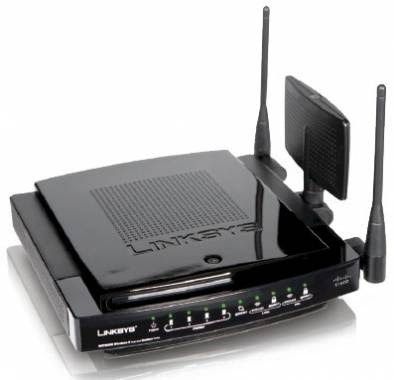
Internet-sharing Router and 4-port Gigabit Switch, with a built-in, dual-band, speed and range enhanced Wireless Access Point
Two simultaneous, separate, radio bands double your available bandwidth
MIMO technology uses multiple radios per band to create robust signals for maximum range and speed, with reduced dead spots


Connect a hard drive or flash-based USB storage device to allow access to your music, video, or data files from within your network, or through the Internet


Advanced wireless security and SPI firewall for protection from Internet attacks


The Dual-Band Wireless-N Gigabit Router is really four devices in one box. First, there's the dual-band Wireless Access Point, which lets you connect to the network without wires. There's also a built-in 4-port full-duplex 10/100/1000 Switch to connect your wired-Ethernet devices together at up to gigabit speeds. The Router function ties it all together and lets your whole network share a high-speed cable or DSL Internet connection.
It also includes a Storage Link that lets you easily add gigabytes of storage space onto your network using readily available USB 2.0 hard drives -- or plug in a USB flash disk for a convenient way to access your portable data files. The built-in Media Server streams music, video, and photos from the attached storage device to any UPnP compatible media adapter. And you can get to your files from anywhere in the world through the Internet.
The Access Point built into the Router uses a dual-band version of the very latest wireless
networking technology, Wireless-N (draft 802.11n). By overlaying the signals of multiple radios for each band, Wireless-N's "Multiple In, Multiple Out" (MIMO) technology multiplies the effective data rate. Unlike ordinary wireless networking technologies that are confused by signal reflections, MIMO actually uses these reflections to increase the range and reduce "dead spots" in the wireless coverage area. The robust signals travel farther, maintaining wireless connections much farther than standard Wireless-G.
With Wireless-N, the farther away you are, the more speed advantage you get. It works great with standard Wireless-G, -A, and -B equipment, but when both ends of the wireless link are Wireless-N, the router can increase the throughput even more by using twice as much radio band, yielding speeds much faster than standard Wireless-G. But unlike other speed-enhanced technologies, Wireless-N can dynamically enable this double-speed mode for Wireless-N devices, while still connecting to other wireless devices at their respective fastest speeds. In congested areas, the "good neighbor" mode ensures that the Router checks for other wireless devices in the area before gobbling up the radio band.
Since the Router can operate in both the 2.4 and 5 gigahertz radio bands at the same time, it effectively doubles your available wireless bandwidth. For instance, you could set up your network to handle video streaming on one radio band, and use the other band for simultaneous data transfers -- avoiding any interference or collisions that would degrade the video performance.
To help protect your data and privacy, the Router can encode all wireless transmissions with industrial-strength 256-bit encryption. It can serve as your network's DHCP Server, has a powerful SPI firewall to protect your PCs against intruders and most known Internet attacks, and supports VPN pass-through. Configuration is a snap with the web browser-based configuration utility.
The incredible speed of Wireless-N and gigabit wired networking is ideal for media-centric applications like streaming video, gaming, and Voice over IP telephony, and gives you plenty of headroom to run multiple media-intense data streams through the network at the same time, with no degradation in performance. With the Linksys Wireless-N Storage Link Router at the center of your home or office network, you can easily add storage, share a high-speed Internet connection, files, printers and multi-player games, and run media-intensive applications at amazing speeds, without the hassle of stringing wires!

WRT150N with DU in U.A.E.


How to configure WRT150N in U.A.E with the ISP DU.
  • Connect a computer to WRT150N to any of the 4 ports.

  • Most of the times DU doesnt provide a modem cause its not required.

  • There is a Ethernet [Cat5] cable that should be connected straight to WRT150N.

  • Reset WRT150N for 20 seconds. The reset button is at the rear side of the router.

  • Turn OFF the WRT150N. Power it ON after 5 seconds.

  • Try Internet from the Computer connected to the router.

  • You should be able to go online. You can change the name of the Wireless Network.

  • Click on Wiereless Tab and configure the wireless settings there.

  • This process applies to all Linksys routers like WRT54G, WRT54GR, WRT54GC, WRT54GL, WRT54GS, WRT100, WRT150N, WRT160N, WRT300N, WRT310N, WRT330N, WRT350N, WRT600N, WRT610N etc.

Ayboll