After upgrading the firmware to 1.00.12 WPA is not working properly on some devices.
Solution : Downgrade the firmware to 1.00.10
Showing posts with label modems. Show all posts
Showing posts with label modems. Show all posts

psyb0t worm on Linksys
More information has surfaced about the botnet “psyb0t,” the first known to be capable of directly infecting home routers and cable/DSL modems.
It was first observed infecting a Netcomm NB5 modem/router in Australia.
The Word is spreading of Psyb0t that is going around and compromising the home routers with the default login for the device. According to published numbers around 80,000-100,000 Linksys and Netgear routers have been affected by Psyb0t. It is important note there are a couple of criteria that must be met before your router can be exploited via Psyb0t. First, the router must be a MIPS device (x86 devices are not vulnerable to Psyb0t). Second, it has to be configured to be administered remotely (from the internet, not the local LAN), and third it needs to be using the default password that the device was originally configured with (a common insecure practice).
Although Psyb0t is the first botnet alleged to be exploiting home routers, the concept of compromising routers with default passwords is not a new one.
At their core, these home routers are mini computers, susceptible to attack and infection if proper precautions are not made to protect them. Default passwords for just about every router made are trivial to find on the internet. In fact, there are sites setup, like routerpasswords.com, that allow you to select the manufacturer of the router and it will tell you the default password based on their known models. Be sure to secure all layers of your home or business (plenty of SOHO businesses use standard Cable/DSL modems for their internet connectivity) network. Never assume that this is being done by someone else or that it is someone else's responsibility. The default settings on most of the gear that you will buy are setup such that initial access and administration of the device is easy (reduces support costs and angry customers). From there it is up to you to make sure best practices are followed to keep your network and data secure from outside intrusion.
It was first observed infecting a Netcomm NB5 modem/router in Australia.
The Word is spreading of Psyb0t that is going around and compromising the home routers with the default login for the device. According to published numbers around 80,000-100,000 Linksys and Netgear routers have been affected by Psyb0t. It is important note there are a couple of criteria that must be met before your router can be exploited via Psyb0t. First, the router must be a MIPS device (x86 devices are not vulnerable to Psyb0t). Second, it has to be
 configured to be administered remotely (from the internet, not the local LAN), and third it needs to be using the default password that the device was originally configured with (a common insecure practice).
Although Psyb0t is the first botnet alleged to be exploiting home routers, the concept of compromising routers with default passwords is not a new one.
At their core, these home routers are mini computers, susceptible to attack and infection if proper precautions are not made to protect them. Default passwords for just about every router made are trivial to find on the internet. In fact, there are sites setup, like routerpasswords.com, that allow you to select the manufacturer of the router and it will tell you the default password based on their known models. Be sure to secure all layers of your home or business (plenty of SOHO businesses use standard Cable/DSL modems for their internet connectivity) network. Never assume that this is being done by someone else or that it is someone else's responsibility. The default settings on most of the gear that you will buy are setup such that initial access and administration of the device is easy (reduces support costs and angry customers). From there it is up to you to make sure best practices are followed to keep your network and data secure from outside intrusion.
Firmware 1.00.12 released for WAG160N
Firmware 1.00.12 released for WAG160N.
Release Date: 09 Mar, 2009
Firmware Version: 1.00.12 (ETSI)
Features :
Release Date: 09 Mar, 2009
Firmware Version: 1.00.12 (ETSI)
Features :
- DownloadSpeedTest(), DUT web UI(port 80) will be inaccessible if set buffer size to a large number
- v1.00.11, Wireless, Fail to find wireless SSID after set WPA password with "linksys" (7 chars)
- GetWLanRadios() cannot return correct WideChannel information
- GetDeviceSettings2() will return wrong country code for United Kingdom.
- Fix bug that SIP call can not be initialized from WAN to LAN if the SIP Invite packet of the SIP Server does'nt include port information.
- Atheros driver's changelist from 6.1.1.98 to 6.1.1.111:
- Add FCC6 for Australia and Canada 5GHz.
- Fixed problem in broadcast performance.
- Disabled power constraint element when country IE is enabled on 2.4GHz channels since some stations will misunderstand the Power Constraint element and cause tx power to be set incorrectly.
- Re-enabled 11n NF periodic Calibration
- Fixed a problem where STA cannot reassociate to AP after beacon stuck & HW reset.
- Enhanced dynamic allocation of TID buffers on ADDBA
- Fixed throughput degradation issue during downstream TCP legacy co-existence tests
- Addressed multiple BSSID performance issue.
ISP setting for UTV internet - UK
Following settings should be configured on the router.
Either from the Setup Page or with the Setup CD.
Encapsulation : PPPoE
Multiplexing : LLC
VPI : 0
VCI : 35
For all Linksys devices that begfin with WAG
Either from the Setup Page or with the Setup CD.
Encapsulation : PPPoE
Multiplexing : LLC
VPI : 0
VCI : 35
For all Linksys devices that begfin with WAG
How to check the wireless settings on the Linksys Router ?
How to check the wireless settings on the Linksys Router ?
The wireless settings that you need to note on a router are :
- SSID [ Name of the Wireless Network.
- Wireless Channel &
- Wireless Security.
Step 1 : Open the Setup page of the router.
Step 2 : Click on Wireless [Second tab on the Tab].

Step 3 : Look for Wireless Network Name SSID. If the SSID is Linksys, you can change the name to something else. Also note if the SSID Broadcast is set to Enable or Disable.

Step 4 : Click Wireless Security and note the current Security Settings.

If the Security Mode is set to WEP :
In this Example we are using WEP 64 bits.

If the Security Mode is WPA :
In this example, we are using WPA-TKIP.

Step 5 : Click Save Settings.

Hotmail Issue.
Upgraded Hotmail. Cannot type anything in the subject line.
This is a common issue these days with some Linksys Devices like AG241, BEFSR41, BEFW11S4, Wireless routers and Gateways.
Upgrading to Firefox has resolved the issue in many cases.
This is a common issue these days with some Linksys Devices like AG241, BEFSR41, BEFW11S4, Wireless routers and Gateways.
Upgrading to Firefox has resolved the issue in many cases.
Enabling MAC Filtering in WAG300N
How to enable the MAC Address Filtering in WAG300N.
 Connect a computer to WAG300N.
Open Internet Explorer.
In the Address Bar type : 192.168.1.1 [Default IP Address of WAG300N].
In the Popup for username and password, type admin for username and admin for password [default].
- Once in the setup page, click on Wireless, the second tab on the top.
- Than select Wireless MAC Filter [third sub tab under wireless.
- Here you need to enable the option.
- In the Access Restriction, you need to specify whether u want to prevent or permit the computers from accessing the Internet.
- With firmware 1.01.01, you can list upto 50 Wireless MAC Addresses.
- If you click on the Wireless Client List in the same page, you can see the MAC Addresses of the Wireless [DHCP clients] devices connected to the router.
- The MAC Address is generally located at the bottom of the devices.
Settings for Cable and Wireless.
Settings for Cable and Wireless in UK for any Linksys Modem.
Encapsulation : RFC2364 PPPoA.
Multiplexing : VC
QoS : UBR.
Auto Detect : Disable.
VPI : 0. VCI : 38.
Username : is provided by cable and wireless
Password : is provided by cable and wireless.
Make sure Keep Alive is selected. And Save Settings.
Encapsulation : RFC2364 PPPoA.
Multiplexing : VC
QoS : UBR.
Auto Detect : Disable.
VPI : 0. VCI : 38.
Username : is provided by cable and wireless
Password : is provided by cable and wireless.
Make sure Keep Alive is selected. And Save Settings.
Setup WPA on Linksys Router !
How can I set up WPA on my Linksys Router?
Step 3 : Select WPA Personal under the Security Mode drop-down menu.
Step 5 : Enter your desired WPA Key on the WPA Shared Key field such as “MyPrivateKey.” This will serve as your network key whenever you connect to your wireless network.

Step 1 : Access the router’s Setup page.
Step 2 : When the router’s web-based, setup page appears, click Wireless and select Wireless Security.
Step 3 : Select WPA Personal under the Security Mode drop-down menu.

Step 4 : Select TKIP on WPA Algorithms.
Step 5 : Enter your desired WPA Key on the WPA Shared Key field such as “MyPrivateKey.” This will serve as your network key whenever you connect to your wireless network.

NOTE : Do not share this key. This key will secure your wireless network. Leave Group Key Renewal to 3600 seconds.
Step 6 : Click Save Settings.
File Sharing in Windows 2000 !
File Sharing in Windows 2000.
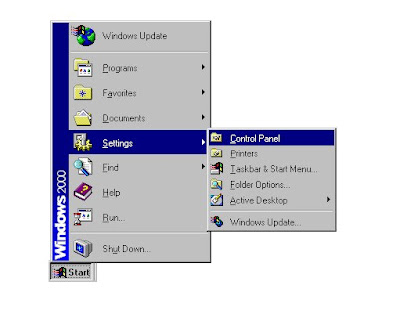
Step : 1 Click Start, Settings, then Control Panel.
Step 3 : Check for the following:
Step : 1 Click Start, Settings, then Control Panel.

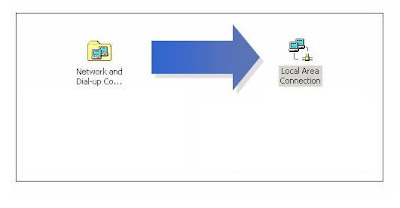
Step 2 : Double-click Network and Dial-up Connections then Local Area Connection.

Step 3 : Check for the following:
- Client for Microsoft Networks
- File and Printer Sharing for Microsoft Networks
- Internet Protocol (TCP/IP)
- NetBEUI
- IPx/SPx
NOTE: If you don't have NetBEUI or IPx /SPx please go to Step 4, otherwise proceed to Step 5.
Step 4 : Click Install and select the protocol that needs to be added:
- NetBEUI
- IPx/SPx Compatible Protocol
Step 5 : Click Close then Close again to go back to Control Panel.
Step 6 : When the Control Panel appears, double-click System.
Step 7 : When System Properties appears, click Network Identification then Properties.
Step 8 : Make sure the computer name you're using is a unique name and workgroup is selected, not domain.
NOTE: Make sure the computer has the same Workgroup as the rest of the network.
Change Password on WAG354G !
How to change the Password on WAG354G.
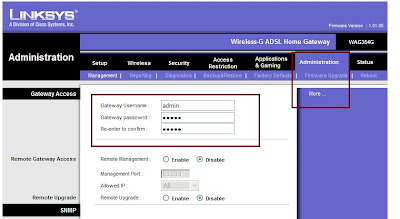
- Connect a computer to the router.
- Open a browser [eg. : Internet Explorer].
- In the Address Bar type : 192.168.1.1 [default IP Address of the router].
- The default password is admin.
- Once in the Setup Page, click on Administration TAB.
- Here you can change the password for the router.

Subscribe to:
Posts (Atom)