Tomato Firmware for Linksys Routers.
What is Tomato Firmware ?
Tomato is free open source Linux-based firmware for several Broadcom-based Wi-Fi routers. The major emphasis of Tomato is on stability, speed and efficiency. It is maintained by Jonathan Zarate, who also developed HyperWRT +tofu. Click here to go to the official Website.
Tomato is NOT compatible with Linksys WRT54G/GS v5-v7 or newer WRT54G/GS routers. These routers do not run Linux. The Linksys WRT54GL router is best if you are interested in making a Tomato-compatible purchase.

Change Password on Router !
How to change the Password on the Linksys Router.
When accessing the router’s web-based setup page, a log-in screen will appear asking for the router’s password. The router’s default password is “admin.” You should change the password for security purposes.
The router’s password must be changed to:
Prevent unwanted users from accessing the router’s web-based setup page.
Enable Remote Management.
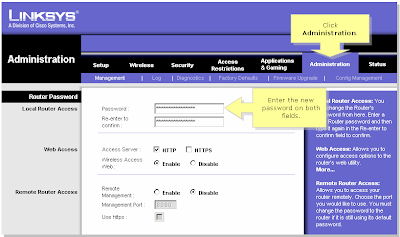
Be sure to click Save Settings after the password is changed.
When accessing the router’s web-based setup page, a log-in screen will appear asking for the router’s password. The router’s default password is “admin.” You should change the password for security purposes.
The router’s password must be changed to:
Prevent unwanted users from accessing the router’s web-based setup page.
Enable Remote Management.
- Connect the computer to the router.
- Open the Setup page of the router.
- Click on Administrtaion Tab, than the very first option is to change the password.

Be sure to click Save Settings after the password is changed.
Change Password on WAG354G !
How to change the Password on WAG354G.
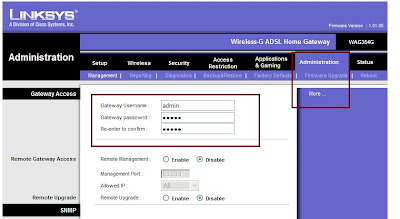
- Connect a computer to the router.
- Open a browser [eg. : Internet Explorer].
- In the Address Bar type : 192.168.1.1 [default IP Address of the router].
- The default password is admin.
- Once in the Setup Page, click on Administration TAB.
- Here you can change the password for the router.

Firmware Release for WAG54GS.
New Firmware Released for WAG54GS.
Firmware version : 1.00.12 (Annex A).
Release Date : 06 December 2005.
- Fixes issues with SES function causing configuration loss.
- Added Incoming and Outgoing log to GUI[Graphical User Interface].
Click here to download the firmware.
Firmware version : 1.00.12 (Annex A).
Release Date : 06 December 2005.
- Fixes issues with SES function causing configuration loss.
- Added Incoming and Outgoing log to GUI[Graphical User Interface].
Click here to download the firmware.
Subscribe to:
Posts (Atom)